Skip to content

ORBITBURN

BROWSER BUILD // RUN-01

Play Orbitburn in your browser

It's free, and there's nothing to download or sign up for.

ORBITBURN // BROWSER BUILD

READY

The first load is under 3 MB, and the sound comes on. It also makes a random anonymous ID with Google Firebase, kept in this browser, to sync your save and leaderboard scores.

Orbitburn is ready. Press Launch to start it.

BROWSER SAVE Your progress is saved in this browser, with a cloud copy under its anonymous ID. Clearing site data loses the ID and the save with it. The Android app won't pick this save up.

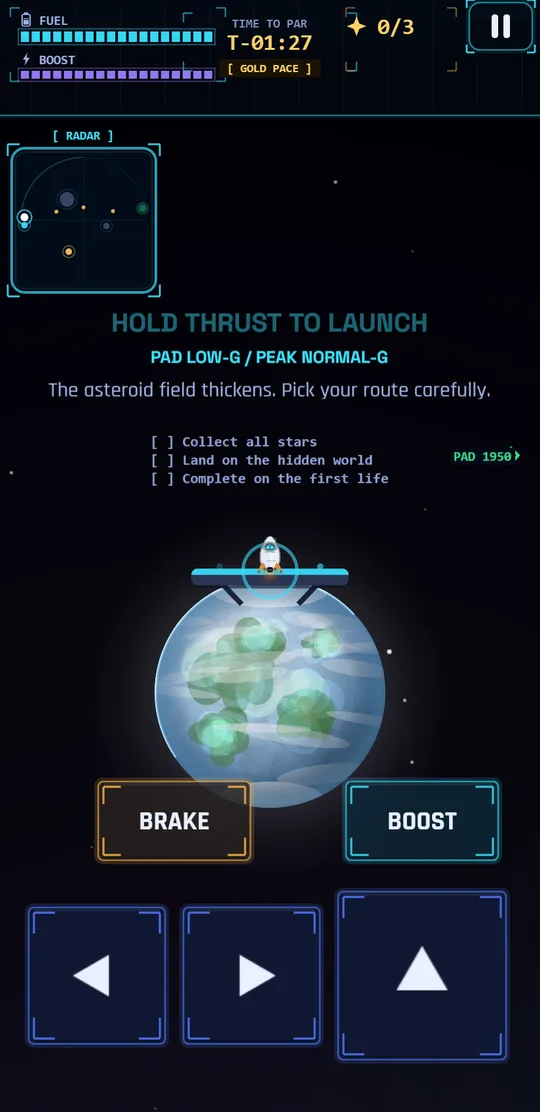
Every planet pulls on your ship. Hold thrust to lift off, let the planets swing you around, and try to land with fuel left. It's the same game as the Android app, all 250 missions of it. Your save lives in this browser, so clearing site data wipes it.

GET THE APPFREE · NO ACCOUNT
GET IT ON GOOGLE PLAY
iOS · IN DEVELOPMENTPLAY IT IN SAFARI FOR NOW

The app opens from your home screen and works offline. Your save lives on the phone instead of in the browser. Rewarded ads and purchases are only in the app.

FLIGHT PRIMER

BRIEFED

Thrust

Hold thrust to burn. Fuel only goes down while you burn, unless the mission has a fuel leak, and the tank doesn't refill by itself. Short burns in the right direction beat long ones. Boost (Shift, Space or the boost pad) pushes harder without burning fuel any faster. It runs off its own meter, which recharges when you stop boosting.

Steering

Steering turns the ship. It doesn't move it. Point where you want to go, then burn. When you let go you keep your speed, and the nearest planet keeps pulling. Falling toward a planet and burning across it usually costs less fuel than fighting it head-on.

Fuel

Canisters on the map top the tank up. A fuel leak drains it all flight. Either way you need enough left at the end to slow down and land. Arriving fast with an empty tank is a crash.

CONTROL MAP

BOUND
STEERA/D OR LEFT/RIGHT
THRUSTW OR UP
BRAKES OR DOWN
BOOSTSHIFT OR SPACE · HOLD WITH THRUST
RESTARTR
PAUSEESC
TOUCHHOLD THRUST · HOLD LEFT OR RIGHT
RENDERERWEBGL, CANVAS FALLBACK

On a phone or tablet the game shows thumb pads instead of the key list. You can drag them to where your thumbs are and resize them in the HUD layout editor. The game remembers where you put them.

COMMON QUESTIONS

ANSWERED

Is Orbitburn free to play in the browser?

Yes. There's nothing to pay for, nothing to sign up for and nothing to download. The Android version is free on Google Play too.

Is the browser version a demo?

No. It's the same game the Android app runs, with all 250 missions and the garage, and there are no ads inside the game. The catch is that clearing your browser's site data deletes the save. Rewarded ads and purchases only exist in the Android app.

Do I need to install anything to play?

No. Press LAUNCH and Orbitburn loads on this page. It uses WebGL if your browser supports it and falls back to canvas if it doesn't.

Does my progress carry between the browser and the Android app?

Not on its own. When you press LAUNCH or FULLSCREEN, the browser version makes a random anonymous ID with Google Firebase, keeps it in this browser, and syncs your save and leaderboard scores to it. The Android app has its own ID and its own save, so installing it doesn't bring anything over. Clearing site data loses the browser's ID, and the save with it. To move progress between them, link a Google account in the game's settings.

What are the controls?

On a phone, hold the thrust pad to burn and hold the left or right pad to turn. You can drag the pads where you want them and resize them in the HUD layout editor, or switch to a joystick you drag to steer in Settings. On a keyboard, W or Up thrusts, A and D or Left and Right turn, and Shift or Space boosts while you thrust.

Can I play Orbitburn offline in the browser?

Usually. The browser version caches itself after the first load, so it normally starts without a connection. Your browser can clear that cache, though. The Android app always works offline.